How to Choose a Video Wall Controller?

A video wall controller determines how images, data, and live feeds appear across multiple displays. Choosing one is not just a matter of counting screens. The controller must match the wall’s resolution, input sources, operating schedule, and control needs. A mismatch can cause blurry text, awkward layouts, or delays that are obvious during a presentation.

Start with the display layout. Note each screen’s resolution, orientation, and bezel width, then check whether the controller supports the complete canvas and bezel compensation. Count the sources you need to show at once. A control room with six live feeds has different demands from a retail wall showing one looping video. This sounds simple. It isn’t always. A listed output count may not reveal how many sources can be displayed simultaneously at full resolution.

Check input and output connections, supported formats, latency, and scaling. For video calls or fast-moving content, visible delay matters. Ask how operators will switch layouts, save presets, and recover after a signal or power interruption. Cooling and rack space deserve attention too; a powerful unit in a cramped cabinet can create avoidable trouble. Review the manufacturer’s technical documentation, and confirm compatibility with the exact display models and source devices. When possible, test the intended feeds before purchase. A specification sheet can still mislead. Real content exposes problems that sample images hide.

The best video wall controller is the one that fits the installation reliably, not simply the one with the longest feature list. Leave room for future sources, but avoid paying for capacity the project will never use. A careful check now can prevent costly redesign later.

How to Choose a Video Wall Controller?

Understanding the Role of a Video Wall Controller

A video wall controller is the system’s traffic manager: it takes one or more video signals, arranges them, and sends the right image to each display. It may show one image across a grid, place several sources in separate windows, or switch layouts as a room’s needs change. The displays make the picture visible; the controller decides how it is composed and distributed. Small details matter.

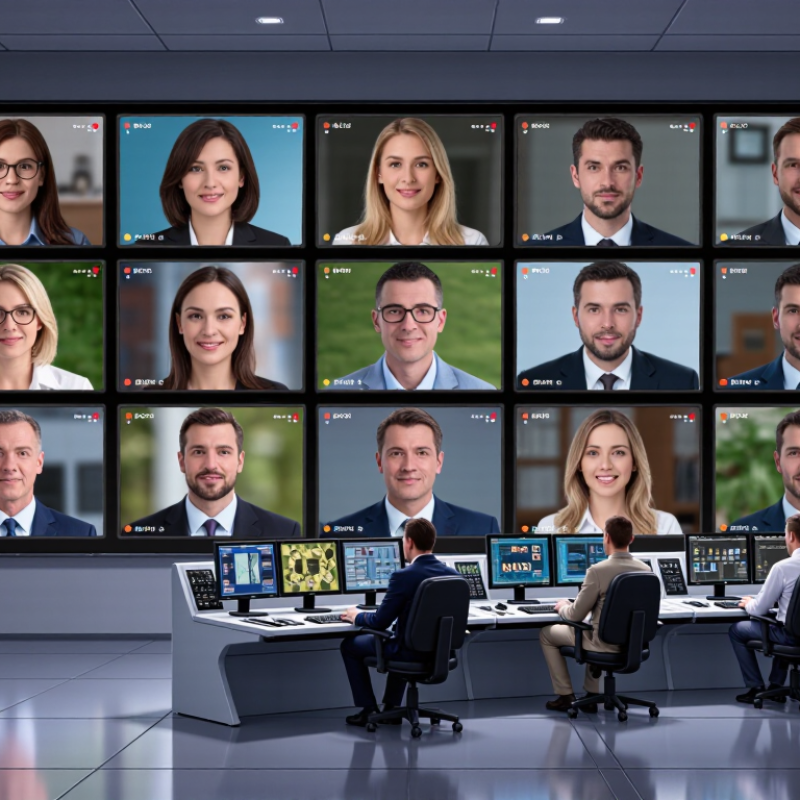
In a control room, an operator might keep a map across the full wall while placing camera feeds in smaller windows. The controller must handle source resolutions, output count, and display geometry without awkward cropping or mismatched edges. Bezel compensation can help align lines across panels, but it cannot fix poorly mounted screens. Low latency matters when staff interact with live sources. Check how the system handles signal loss, layout changes, and recovery after a restart.

Specifications are useful, but they do not tell the whole story. A high input count may look impressive yet leave little flexibility for everyday layouts. Test actual sources and displays before deciding. Easy to miss. Testing can reveal scaling artifacts, delayed switching, or clumsy controls. A controller cannot replace sound cabling, calibrated displays, or a clear operating plan; it coordinates them. Even a tidy design may need revision once people use the wall.

How to Choose a Video Wall Controller? – Understanding the Role of a Video Wall Controller

Selection dimension What the controller does What to check Why it matters
Display layout and outputs Distributes image content across multiple displays and arranges the outputs into a wall layout. Confirm the number of display outputs supported and whether the controller can map them to your planned rows and columns. The output count and layout capability must match the physical display wall.
Resolution and image format Receives, processes, scales, and routes video signals to the displays. Check supported input and output resolutions, refresh rates, color formats, and signal standards against the sources and displays. A mismatch can prevent a signal from displaying or limit image quality or refresh rate.
Input capacity and source types Connects video sources such as computers, cameras, media players, or network streams, depending on the system design. Count the sources needed at the same time and verify the required physical or network input types. The controller needs enough compatible inputs for the intended content and workflows.
Windowing and scaling May show one source across the whole wall, divide the wall into zones, or place multiple sources in separate windows. Check the number of simultaneous windows, available layouts, resizing options, and whether windows can overlap or move freely. These capabilities determine how flexibly operators can present information.
Bezel compensation Adjusts image geometry to account for the borders between displays when content spans multiple screens. Confirm that compensation can be configured for the actual display dimensions and bezel widths. Proper adjustment helps continuous images appear more natural across screen boundaries.
Latency and synchronization Processes and distributes signals; some systems also synchronize output timing across displays. Ask for end-to-end latency information and confirm synchronization requirements for the planned sources and displays. Low latency is important for interactive use, while synchronized output helps avoid visible timing differences.
Control and integration Provides ways to select sources, change layouts, and manage the wall, such as software interfaces or external control connections. Check the control methods, user permissions, automation options, and compatibility with the site’s existing control system. Straightforward control reduces operating effort and helps fit the controller into existing workflows.
Reliability and maintenance Runs the processing and routing needed to keep content on the wall; system designs may include monitoring or redundant components. Review monitoring, recovery behavior, service access, warranty terms, and whether redundancy is available where required. Operational requirements determine how much downtime risk and maintenance effort are acceptable.
Installation and environment May be installed in a rack, control room, or other equipment area, depending on its form factor and design. Check dimensions, power requirements, cooling needs, cable routes, and the specified operating environment. Physical and environmental fit affects safe installation and long-term operation.
Expansion and future needs Determines the available capacity for additional sources, displays, or more complex layouts. Compare current requirements with planned growth and check whether capacity can be expanded without replacing the whole system. Planning ahead can reduce the cost and disruption of later upgrades.

Selection tip: Start with the wall’s display layout, source list, required image formats, and operating workflow, then verify those requirements against the controller’s specifications.

Defining Display Size, Layout, and Content Requirements

Before selecting a video wall controller, calculate the wall’s full pixel canvas. Multiply each display’s native resolution by the number of panels across and down. A four-by-three wall of 1920 × 1080 displays needs content handling for a 7680 × 3240 canvas. Check bezel gaps, portrait panels, and uneven rows, too. Small gaps matter.

Grand View Research estimated the global digital signage market at USD 28.83 billion in 2022, with an 8.1% projected annual growth rate from 2023 to 2030. AVIXA’s Industry Outlook and Trends Analysis projected professional audiovisual industry revenue of USD 325 billion by 2026. These figures signal wider deployment, not a controller specification. Market forecasts also use different scopes. Treat them as context, not proof that a larger system fits your room.

Map content before comparing hardware. A control-room wall may need several live feeds, while a retail display may run one canvas with scheduled zones. List source resolutions, frame rates, simultaneous windows, and whether operators must rearrange them quickly. Then match those needs to inputs, outputs, scaling, and layout presets. Measure the viewing distance from the nearest seat; tiny labels can disappear across a large wall. I would leave spare capacity for a future source, but not assume every site needs it. That assumption deserves a second look.

Checking Compatibility with Displays and Signal Sources

A video wall controller must match the displays it will drive, not just the number of screens. Check each display’s native resolution, refresh rate, input connector, and supported signal format. A wall of four 4K panels may need different output capacity from sixteen Full HD panels. Confirm that the controller can provide the required output resolution on every port at the same time.

Also check how the controller handles screen layouts, bezels, and portrait orientation. Small differences in panel settings can create visible gaps or uneven image edges. It sounds obvious, but connector shape alone does not prove compatibility. A converter may change the connector while limiting resolution or refresh rate. Test the complete signal path, including cables and adapters, before installation.

Signal sources matter just as much. List every source device and note its output format, resolution, and frame rate. Confirm that the controller accepts those signals and can scale them cleanly for the wall. Check supported copy-protection and audio requirements where relevant. For mixed sources, such as a computer and a camera, test each one under realistic conditions. Do not rely only on a specification sheet. A quick test with the actual displays can reveal handshake problems that are easy to miss during planning. I would leave some room for adjustment; compatibility is sometimes less tidy than the diagrams suggest.

Comparing Processing, Control, and Connectivity Features

How to Choose a Video Wall Controller?
Comparing Processing, Control, and Connectivity Features

A video wall controller must do more than spread an image across several screens. Its processing capability determines how many inputs it can handle, which resolutions it supports, and whether it can scale content cleanly. Check the maximum canvas size and refresh rate against your display layout. A controller that looks adequate on paper may struggle when several high-resolution sources run together. Small text can become soft. Motion may feel delayed.

Control features shape daily operation. Look for straightforward layouts, saved presets, and clear source selection. An operator should be able to switch from a four-camera view to a presentation without hunting through nested menus. Remote access can help when the equipment rack sits in another room, but permissions and recovery steps deserve attention too. Simple is better. Still, “easy to use” varies between teams, so test the interface with the people who will use it.

Connectivity determines how well the controller fits the room. Count the required video inputs and outputs, then leave some capacity for future sources. Confirm connector types, cable distances, and support for audio or network control where needed. A neat spec sheet cannot reveal every installation snag; long cable runs and adapters can introduce surprises. I would verify the actual source devices before purchasing, even if that feels like an unglamorous extra step.

Evaluating Installation, Scalability, and Ongoing Support

How to Choose a Video Wall Controller?

Evaluating Installation, Scalability, and Ongoing Support

Installation fit is more than rack space. Check input types, output resolution, cable distance, heat, and access for maintenance. A controller may support the right screens yet still complicate commissioning if signal paths are unclear. Map each source to each display before purchase. Leave room for service access. Small details matter.

Scalability depends on both hardware capacity and system design. Ask how the controller handles added displays, new sources, and mixed resolutions. AVIXA’s 2024 Industry Outlook and Trends Analysis estimated professional audiovisual revenue at $325 billion in 2024, with growth projected to $402 billion by 2029. This broad market forecast is not a video-wall sales figure, but it points to expanding AV deployments. Choose a system that can grow without requiring a full replacement. Still, expansion plans can change. Avoid paying for capacity you may never use.

Ongoing support deserves the same scrutiny as technical specifications. Confirm software update procedures, response times, warranty terms, and access to replacement parts. Ask who diagnoses a fault at 8 a.m. on a busy day. A clear answer helps. Request documentation for configuration backups and recovery; these are easy to overlook during installation. Even a well-designed system can frustrate operators if support is slow or responsibilities are vague. Read the service terms carefully, and question assumptions that sound too neat.

Planning for a Video Wall Controller

Output counts below are calculated from example wall layouts. The recommended capacity includes approximately 20% spare outputs, rounded up—a planning allowance, not a universal standard. When comparing controllers, also check input compatibility, installation requirements, and the availability of ongoing technical support.

Need Help?
X

Ready to Talk?

Our team is ready to connect.