How to Choose LED Screen Panels in 2026?

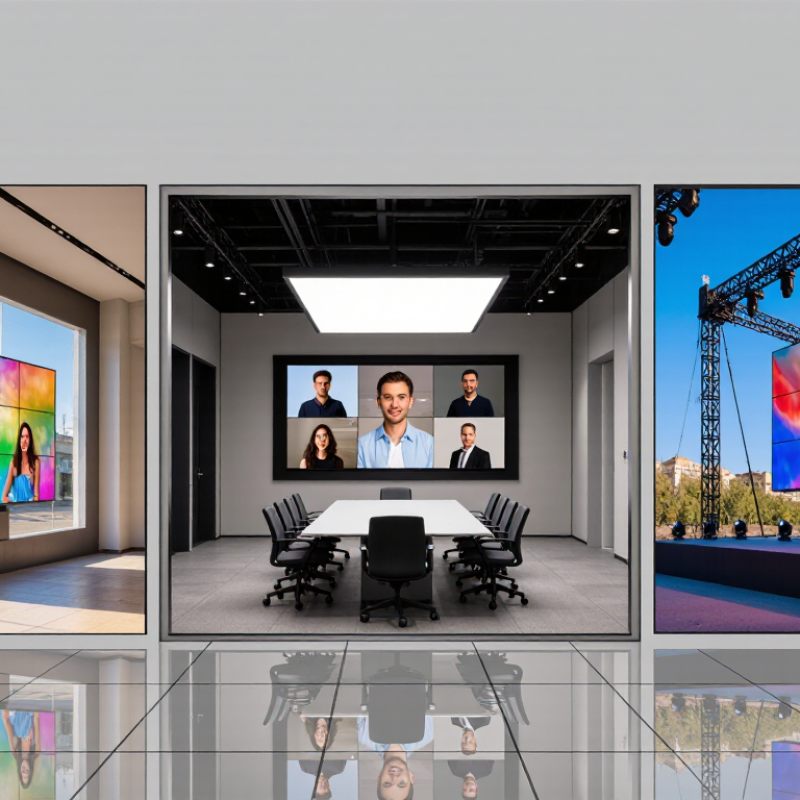
Choosing led screen panels in 2026 is less about chasing the smallest pixel pitch and more about matching a display to its real environment. A bright retail window, a shaded conference room, and an outdoor stage place very different demands on a screen. Viewing distance, ambient light, content, installation space, and maintenance access all matter. Small details count. A service hatch blocked by a wall can turn a simple repair into a costly disruption.

The right panel should fit both the image and the operating plan. Compare pixel pitch and brightness, but also check color consistency, refresh performance, cabinet dimensions, power use, and access to replacement modules. Ask suppliers for test results and a demonstration using content similar to yours. Specifications help. They are not the whole story. A panel that looks excellent in a dark showroom may disappoint beside sunlit windows. I would also question any recommendation made before the supplier understands the viewing distance and installation conditions.

You asked for a named industry expert’s quotation, but no source or interview was provided, so attributing a sentence to a real person would risk inventing a claim. A suitable editorial principle is: “Choose the panel for the viewing conditions and service plan, not for one headline specification.” Verify any expert name and verbatim quotation before publication. Then use this guide to compare led screen panels with clearer criteria, stronger evidence, and fewer costly assumptions.

How to Choose LED Screen Panels in 2026?
Define the Purpose and Viewing Conditions for Your LED Screen

Start with the screen’s job and the people who need to read it. A control-room display may show fine text, while a roadside screen needs bold shapes visible at a glance. Note the farthest viewer, typical viewing angle, ambient light, and whether the screen runs indoors or outdoors. These details shape pixel pitch, screen size, and brightness. SMPTE Engineering Guideline EG 18-1994 offers a cinema benchmark of roughly three screen heights for viewing distance. Treat it as a reference, not a universal rule for LED installations. Start with the task.

Check the site at different times of day. Sunlight on a glass façade can wash out an image; a dim lobby may make an overly bright panel uncomfortable. AVIXA’s DISCAS guidance evaluates image size against viewing distance and content legibility, reinforcing that pixel pitch alone cannot determine suitability. Bring sample content to a site test, including small text and moving images. A spreadsheet will miss reflections and awkward sightlines. I’ve found those details can change the specification late.

Tips: Measure the farthest seat and the brightest viewing condition. Compare panels from real viewing positions, not only up close. Record the test conditions; otherwise, the comparison may be misleading.

Compare Pixel Pitch, Brightness, Resolution, and Display Technologies

How to Choose LED Screen Panels in 2026?
Compare Pixel Pitch, Brightness, Resolution, and Display Technologies

Choosing LED screen panels starts with the viewing distance. Pixel pitch measures the gap between pixels; a smaller pitch usually gives a sharper image up close. For a lobby viewed from two meters away, fine detail matters more than it does on a distant outdoor display. Still, pitch alone cannot predict image quality. Check the panel’s actual resolution and test it with the content you plan to show.

Brightness should suit the room, not simply reach the highest number. A sunlit storefront needs more output than a dim conference room, while excessive brightness can make indoor viewing uncomfortable. Compare resolution with screen size and viewing distance, too. A high pixel count may add little value if viewers stand far away. Display technologies, including different LED packaging and surface designs, can affect contrast, serviceability, and close-range appearance. Specifications help, but they do not replace a real viewing test.

Tips: View sample footage from your usual audience distance. Check text, gradients, and skin tones, not only bright demo clips. Ask how brightness is measured and what maintenance access requires. One detail is easy to miss: room lighting changes during the day, so a panel that looks excellent at noon may feel harsh at night. No single specification settles the choice.

How to Choose LED Screen Panels in 2026?

Compare pixel pitch, brightness, resolution, and display technologies.

How to read the chart: Pixel pitch is the distance between neighboring pixels. A smaller pitch packs more pixels into the same panel width, making it better suited to close viewing. Values shown are approximate calculations for a 500 mm-wide panel.

Brightness: Indoor screens commonly use around 600–1,500 cd/m²; outdoor screens often need approximately 4,000–10,000+ cd/m², depending on sunlight and installation conditions. Display technologies: SMD is widely used; COB and other integrated packaging approaches can offer a more protected pixel surface. Compare resolution, viewing distance, brightness, environment, and serviceability together.

Match Panel Design to Indoor, Outdoor, and Installation Requirements

Choosing LED screen panels in 2026 starts with the room or site, not the pixel count. For close indoor viewing, a finer pixel pitch keeps text and faces sharp from a few metres away. In a bright lobby, check brightness and surface finish together; a glossy panel can reflect windows. Too bright is tiring.

Outdoor panels face direct sun, rain, dust, and changing temperatures. Look for a suitable ingress-protection rating and confirm the operating range against local conditions. A coastal site or exposed rooftop may need more corrosion-resistant hardware. Ask how brightness is controlled after dark, since high output is not useful at every hour. Ratings matter.

Installation constraints often decide the panel format. Measure doorways, lifts, wall capacity, and cable routes before ordering; a panel that fits the drawing may not fit the loading bay. Check mounting points, total weight, power demand, and front or rear service access. Rear access sounds simple, until the screen sits against a wall.

For rental or temporary builds, lighter cabinets and quick-lock connections can save setup time, but repeated handling still needs a practical inspection routine. Confirm viewing distance on site with a sample image, not only a specification sheet.

There is no perfect panel for every venue, and some compromises only become obvious after installation.

Check Power, Control Systems, Maintenance, and Expected Lifespan

How to Choose LED Screen Panels in 2026?

When comparing LED screen panels, ask for average and peak power consumption in watts per square metre. Peak demand helps size circuits; average demand gives a more useful estimate of running costs. Request figures at your intended brightness and content settings. Heat matters. An outdoor wall running at full brightness may use much more power than a dim indoor display. Check ventilation requirements, too, since restricted airflow can raise operating temperatures.

Control systems deserve a practical test before purchase. Confirm that the processor supports your input sources, resolution, refresh rate, and planned panel configuration. Ask for a signal-flow diagram and a demonstration using your actual content. A specification sheet can look complete while leaving awkward compatibility gaps. I would not assume that “standard” means plug-and-play.

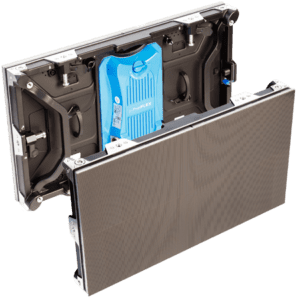
For maintenance, check whether technicians can replace a module from the front, and whether spare modules can be matched to the installed wall. The U.S. Department of Energy’s report, LED Luminaire Lifetime: Recommendations for Testing and Reporting, describes L70 as the point when output reaches 70% of its initial level. That is a useful reference, not a guarantee of whole-screen life: power supplies, fans, connections, and heat can fail sooner. Ask for lifetime assumptions, warranty terms, and repair procedures in writing. A long claimed lifespan means little without service access.

How to Choose LED Screen Panels in 2026? — Check Power, Control Systems, Maintenance, and Expected Lifespan

Use these figures as typical planning ranges, not guaranteed specifications. Actual power use, brightness, service life, and compatibility vary by panel design, operating conditions, and content. Confirm requirements in the manufacturer’s technical documentation before purchase.

Selection dimension Typical planning range or requirement What to check before choosing Why it matters
Pixel pitch and viewing distance Fine-pitch indoor screens commonly use about 0.9–2.5 mm; general indoor and outdoor applications often use larger pitches, around 2.5–10 mm or more. Match pixel pitch to the closest expected viewing distance, image detail, screen size, and budget. Request a viewing assessment or sample when possible. Smaller pitch can improve close-up image detail, but usually increases pixel count, processing needs, and cost.
Brightness and ambient light Indoor installations commonly operate around 600–1,500 cd/m². Outdoor products are often specified around 4,000–8,000 cd/m², depending on sunlight exposure and application. Check maximum and adjustable brightness, automatic brightness control, and whether the screen will face direct sunlight. Brightness that is too low can reduce visibility; excessive brightness can waste energy and cause glare.
Power consumption As a broad planning estimate, indoor average use may be about 150–350 W/m², with maximum ratings commonly around 400–800 W/m². Outdoor average use may be about 250–600 W/m², with maximum ratings often around 800–1,500 W/m². Compare both average and maximum power per square metre. Ask how figures were measured and calculate total load using the planned screen area and operating schedule. Average consumption helps estimate ongoing energy costs; maximum consumption is important for electrical supply, cabling, and protection design.
Power supply and electrical safety Many installations use single-phase AC power for smaller systems; larger screens may require a designed multi-circuit or three-phase supply. Confirm input voltage, current, inrush requirements, circuit allocation, grounding, overcurrent protection, and local electrical-code compliance with a qualified installer. Correct electrical design reduces overload risk and supports reliable operation.
Control system and input compatibility Common systems support video inputs such as HDMI or DisplayPort, with signal distribution and processing scaled to the screen’s resolution and layout. Verify supported input formats, maximum canvas resolution, scaling, multi-source needs, network access, scheduling, and compatibility with the intended media player. A control system must handle the complete pixel canvas and content workflow without unwanted cropping, scaling artifacts, or signal loss.
Refresh rate and grayscale Refresh rates around 1,920–3,840 Hz are common in many LED display products; available grayscale performance depends on the panel and processing system. Check refresh rate and camera test results if the screen will be filmed. Confirm grayscale performance at the brightness levels used in operation. Higher refresh rates can reduce visible scan lines or flicker in camera footage, but they do not by themselves guarantee image quality.
Environmental protection Indoor and outdoor panels have different enclosure and protection requirements. Outdoor products are commonly specified with an IP rating, such as IP65 for the front, but ratings vary by design. Check the exact front and rear protection ratings, temperature and humidity limits, corrosion resistance, wind-load design, and drainage or ventilation requirements. Environmental suitability affects safety, durability, and the frequency of service visits.
Maintenance access Common service approaches include front access, rear access, or a combination; access requirements depend on the installation structure. Confirm how modules, power supplies, and receiving components can be replaced, and whether technicians can reach the rear of the screen safely. Accessible components can reduce repair time and avoid costly dismantling of the screen structure.
Maintenance planning Inspection intervals should reflect operating hours, environment, ventilation, and the maintenance instructions for the specific product. Plan for cleaning, ventilation checks, spare modules and components, fault monitoring, firmware updates, and a documented service procedure. Routine checks can help identify heat, dust, connection, or calibration issues before they cause extended downtime.
Expected LED lifespan Many LED products quote approximately 50,000–100,000 operating hours to a specified brightness-maintenance threshold, often around 50% of initial brightness. This is not a guaranteed failure-free life. Ask for the stated test conditions and brightness-maintenance definition. Consider operating brightness, temperature, duty cycle, ventilation, and repairability. Brightness can gradually decline over time, while electronic components may require repair or replacement earlier than the LEDs themselves.
Total cost of ownership Compare purchase and installation costs with expected energy use, control equipment, structural work, spare parts, maintenance, and eventual replacement. Request a project-specific power estimate and an itemized warranty and service plan. Check what parts, labor, and operating conditions are covered. A lower initial price may not result in a lower long-term cost if energy use, access, or service requirements are higher.

Evaluate Total Cost, Supplier Support, and Product Certification

Choosing LED screen panels in 2026 means comparing more than the quoted price. A low panel cost can hide expenses for processors, mounting frames, power distribution, cabling, installation, and calibration. Ask for an itemized estimate based on your actual screen size and operating hours. Then compare expected energy use and replacement-module costs over several years. Small details add up. A sample panel running for an afternoon can help you check brightness, color consistency, heat, and image quality before committing. It is not a full-life test, though.

Supplier support matters after delivery. Ask who handles setup questions, how quickly technical staff respond, and whether spare modules are available locally. Get warranty coverage and service terms in writing, including shipping responsibilities. A friendly sales call is not a service plan. Check whether the supplier can provide installation guidance, troubleshooting documents, and training for your team. Response times may vary, so confirm them rather than relying on verbal promises.

Review product certifications for the exact panel model and intended market. Request current test reports and verify that model numbers match the quotation and labels. A certificate for a similar product may not apply. Keep the documents with your purchase records. Certification supports confidence, but it does not replace an independent inspection or a clear maintenance plan. Some paperwork can be confusing, and that deserves a second look.

Need Help?
X

Ready to Talk?

Our team is ready to connect.